Instagram MCP server
Give your AI assistant read access to public Instagram data. Ask it in plain language and it fetches profiles, posts, reels, stories and comments on its own.
Connect your assistant →Popular platforms
Set it up in a couple of minutes
Capabilities
What your agent can pull from Instagram
Say what you need in ordinary words: the agent goes after the media, the account it came from and the people around that account.
Instagram profile
The bio, how many followers and posts the account has, and whether it is a verified or a business one.
Account search
Look an account up by name for those times when the exact username will not come to mind.
Posts and reels
The recent posts and reels of an account, captions and media included.
Post by URL
A single post, reel or carousel: every slide it holds, the caption and who published it.
Comments
What people left under a post or reel, together with who wrote it and when.
Likers
The accounts that liked a post or reel, with their names and pictures.
Followers
The accounts following a profile, handed back page by page.
Following
The accounts a profile follows itself, also page by page.
Stories live now
Everything the account has up at this moment, caught before it expires.
Story by URL
One story on its own: the media, who posted it and the moment it disappears.
Highlights
The collections an account has saved, and every story kept inside them.
Video download
Direct links to the video behind a post, a reel or an IGTV clip. Nothing is stamped on it.
Setup
Connect the Instagram MCP server
Pick your client and follow its steps. Claude Code, Cursor, VS Code and any other MCP client read a JSON config. Claude, Claude Desktop and ChatGPT take the server URL through their own interface. Whichever you pick, the first connection opens our sign-in window: sign in there, or press Sign up if you do not have an account yet.
Universal
JSON configWorks with any client that speaks MCP. Only the location of the config file differs.
- Open the MCP settings of your client and find its config file, usually mcp.json
- Add the server to the mcpServers block, as in the config below
- Save the file and restart the client so it loads the server
- Ask for what you need in a chat, in plain language
{
    "mcpServers": {
        "anonyig": {
            "type": "http",
            "url": "https://api-wh.anonyig.com/instagram/mcp"
        }
    }
}Ask for something in a chat
- Download the video from this post: instagram.com/p/…
- Save every story this account has up right now
- Grab the video from this reel instagram.com/reel/… and tell me what the caption says

Claude
Claude on the web
Server URLNeeds a paid Claude plan: Pro, Max, Team or Enterprise.
- Open claude.ai and sign in to your account
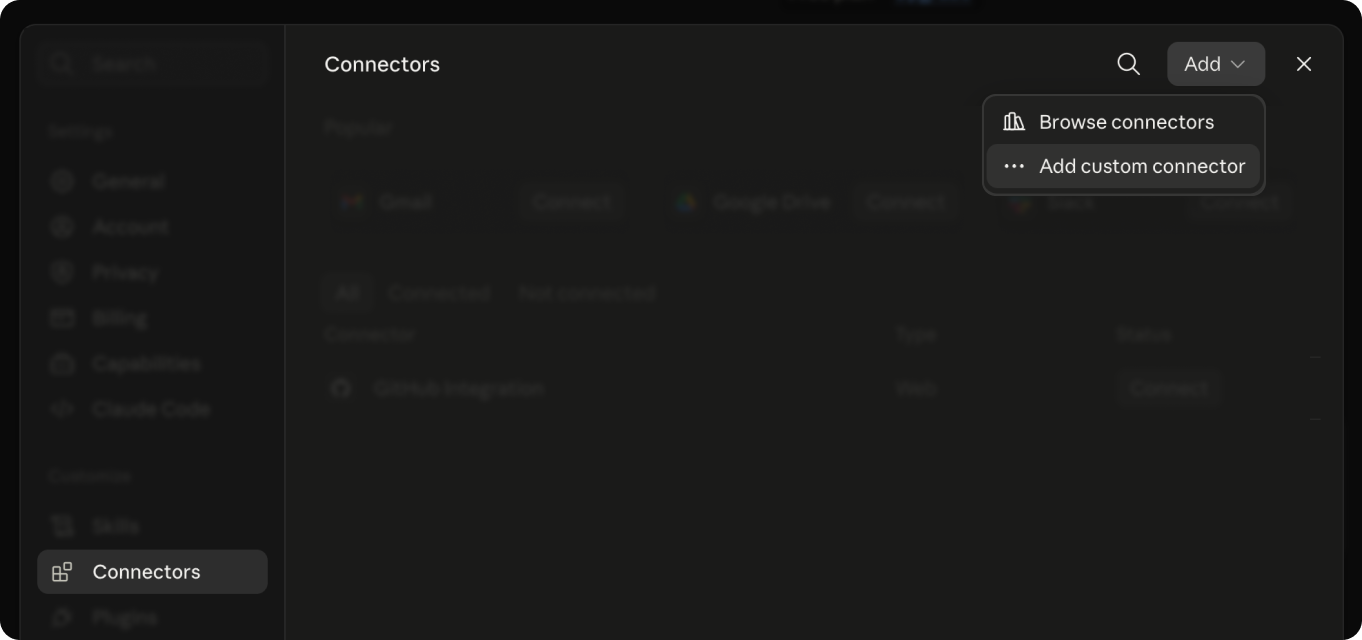
- Click your name in the bottom left, then Settings, then Connectors
-
Choose Add custom connector
- Paste the server URL below into the address field, then press Add
- Press Connect: a sign-in window opens. Sign in there and confirm access
- Back in the chat, click the tools icon under the message box and switch the Instagram MCP server on

https://api-wh.anonyig.com/instagram/mcp
Connector not showing up? Reload the page, then check it is switched on in the tool list of the chat.
Claude Desktop
Server URLNeeds a paid Claude plan and the Windows or macOS app.
- Install and open the Claude app, then sign in
- Open Settings, then Connectors
- Choose Add custom connector
- Paste the server URL below into the address field, then press Connect
- A browser window opens for the sign-in: sign in there and confirm access
- Return to the app: the Instagram MCP server appears among the tools
https://api-wh.anonyig.com/instagram/mcp
claude_desktop_config.json is a separate mechanism for local servers and does not apply here.
Keep the app up to date: custom connectors only work in recent versions.
Claude Code
Terminal commandTerminal. Claude Code installed.
- Install Claude Code and sign in, following the prompts on first run
- Run the add command below in your terminal
- Start Claude Code and type /mcp
- Pick the server from the list and press Authenticate: a browser window opens for the sign-in
- Sign in there and confirm access, then come back to the terminal
claude mcp add --transport http anonyig https://api-wh.anonyig.com/instagram/mcpThe server name in that command is only a label in your own list — swap it for anything you like.

Cursor
JSON config- Open Settings, then MCP
- Add the config below to mcp.json
- Restart Cursor and confirm access when it asks you to sign in
{
    "mcpServers": {
        "anonyig": {
            "type": "http",
            "url": "https://api-wh.anonyig.com/instagram/mcp"
        }
    }
}
VS Code
JSON config- Open the MCP settings of your workspace
- Add the config below to mcp.json
- Reload the window and confirm access when it asks you to sign in
{
    "servers": {
        "anonyig": {
            "type": "http",
            "url": "https://api-wh.anonyig.com/instagram/mcp"
        }
    }
}
ChatGPT
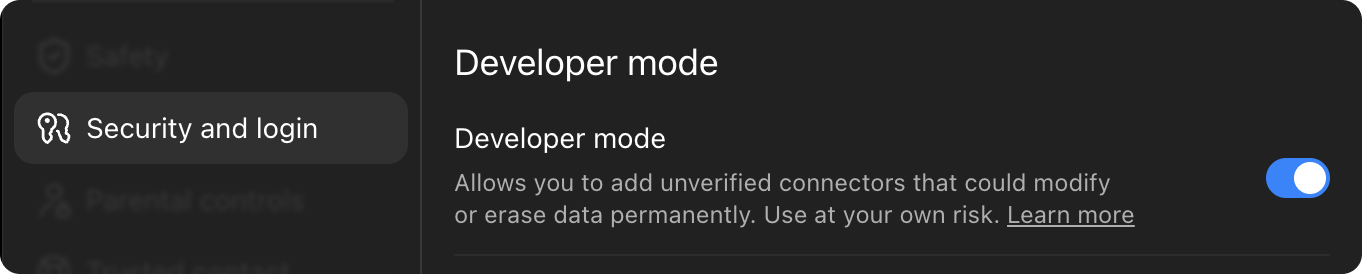
Server URLA regular ChatGPT account is enough. Developer mode has to be switched on in the settings.
- Open chatgpt.com and sign in to your account
-
Open Settings, then Security and login. Find Developer mode and switch it on
- Close the settings and open the plugins page at chatgpt.com/plugins
-
Click the + in the top right corner and pick Create plugin. In the open window, click Create MCP application

- Paste the server URL below into the address field
- Set OAuth as the authentication method and press Connect, or Sign in
- A sign-in window opens: sign in there and confirm access
- Done. In a chat, open the tools icon and switch the Instagram MCP server on


https://api-wh.anonyig.com/instagram/mcp
Just ask the assistant for what you need: it calls the commands by itself when your request needs them.
Examples
How people ask it for things
No command names to remember. Describe what you want and the assistant works out which calls it needs.
Download Instagram videos and reels
Public postsOne block in the config of your client is the whole connection. After that you ask for media in plain words.
{
    "mcpServers": {
        "anonyig": {
            "type": "http",
            "url": "https://api-wh.anonyig.com/instagram/mcp"
        }
    }
}Grab the video from this reel instagram.com/reel/… and tell me what the caption says
calls the Instagram MCP server and picks the tool the request needs
The reel is downloaded, and the caption that came with it is right below.
reel.mp4
Want the cover image as a separate file too, or the rest of the recent posts from that account?
Plans
How much the Instagram MCP server costs
Every plan opens the same set of tools. They differ in how many requests a month you get.
50 free requests
Across all the tools together, with no card asked for. Enough to see whether the data fits before you pay for anything.
Pro
$50.00/mo
50,000 requests per month
- A hard limit: the plan stops at its quota and nothing is billed on top
- Proxy included in the price
- Access to the MCP server included
Best value
Ultra
$150.00/mo
250,000 requests per month
- A hard limit: the plan stops at its quota and nothing is billed on top
- Proxy included in the price
- Access to the MCP server included
Mega
$250.00/mo
1,000,000 requests per month
- A hard limit: the plan stops at its quota and nothing is billed on top
- Proxy included in the price
- Access to the MCP server included
Questions
Frequently asked questions
The short answers about the protocol, the clients it works with and the limits of public data.